Why Next.js App Router Is the Right Choice for a Business Website in 2026
Choosing a framework shapes a site's speed, SEO, and maintainability for years. Here's why Next.js App Router is our default for business websites.
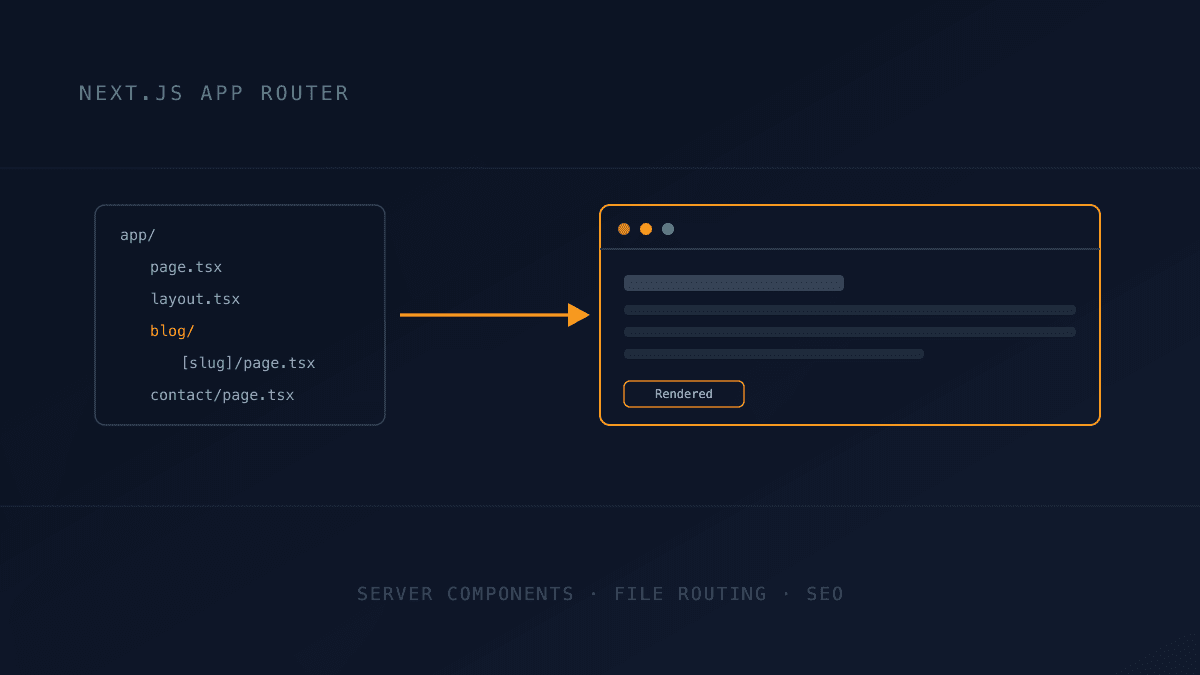
Choosing a web framework is one of those decisions that looks like a technical detail early on and turns into a business constraint two years later, once the site needs to scale, rank, or simply survive a redesign. At Buildframe, Next.js's App Router is our default for a new business website, not because it is the newest option, but because of what it actually changes about how a site performs, how it ranks, and how long it stays maintainable once someone other than the original developer has to work on it.
Server Components by Default Mean Less JavaScript Shipped to the Browser
Next.js's App Router renders components on the server by default, only sending JavaScript to the browser for the specific pieces that need interactivity, a button, a form, a toggle. Older React setups, and most page-builder platforms, ship a much larger JavaScript bundle for every page regardless of how little of it is actually interactive. Less JavaScript to download and execute is one of the most reliable ways to improve both load time and the Interaction to Next Paint metric that Google now uses as a ranking signal.
Built on React, an Open Ecosystem, Not a Proprietary Platform
Because Next.js is built directly on React, hiring, documentation, and third-party libraries are not locked to one vendor's ecosystem the way many page-builder platforms are. A future addition, a customer portal, a new payment provider, a different host, works with standard, widely supported tools rather than a platform-specific plugin marketplace. This is also why our own migration engagements standardize on it: a site inherited from a departing developer is far easier to hand off safely when it is built on open, well-documented foundations instead of a vendor-specific page builder.
Built-In Image and Font Optimization Without a Plugin Ecosystem
Next.js's image component automatically resizes, re-encodes, and lazy-loads images through a built-in optimization pipeline, the same mechanism that took one of our own portfolio screenshots from 2.1MB down to 66KB with no visible quality loss. On WordPress or a typical page builder, getting the same result usually means installing and maintaining a third-party image-optimization plugin, another moving part that can break on an update. Font loading works the same way: fonts are self-hosted and preloaded automatically, avoiding the render-blocking font requests that are a common cause of slow page speed on redesigned sites.
File-Based Routing and Layouts Keep Large Sites Maintainable
Every route in a Next.js App Router project is just a folder in the file system, and shared layouts, navigation, footers, sidebars, live in a single file that wraps every page beneath it automatically. This matters far more once a site grows past a handful of pages: adding a new service page or blog category doesn't mean copying header and footer markup into another template, it means adding one file that inherits the layout automatically. Fewer places for markup to drift out of sync is fewer bugs at redesign time.
Server-Side Rendering and Static Generation in the Same Framework
A single Next.js project can serve some pages fully static, pre-built at deploy time and served instantly from a CDN, and others server-rendered on every request, for content that changes per visitor or needs to stay current, like a blog fed from a database, without switching frameworks or bolting on a second system. Most legacy CMS platforms force a choice between one rendering strategy for the whole site; Next.js lets each route use whichever strategy actually fits its content.
SEO Metadata and Structured Data as First-Class, Not an Afterthought
Page titles, meta descriptions, Open Graph tags, and JSON-LD structured data are defined directly in each route's code in Next.js's App Router, generated per-page rather than patched in through a separate SEO plugin's settings screen. This is also what makes something like this blog's FAQPage structured data straightforward to wire up correctly, since it lives in the same codebase as the content it describes instead of a disconnected plugin configuration.
What This Looks Like on a Real Project
This is not theoretical for us. Buildframe's own site, including this blog, runs on Next.js's App Router: the blog list, individual posts, and their FAQPage structured data are all server-rendered routes in the same project, updated straight from an admin panel with no separate CMS plugin or page-builder export step involved. When we recommend App Router to a client, it is the same architecture we run our own business on, not a stack we sell but don't use ourselves.
When Next.js Might Not Be the Right Choice
None of this makes Next.js the right choice for every project. A simple five-page brochure site with no blog, no growth plans, and a tight budget can be perfectly well served by a lighter static site or even a well-built page-builder site, and paying for App Router's architecture there is paying for headroom you won't use. The decision point is usually growth: if the site is expected to add content regularly, scale past a dozen pages, or needs to rank competitively against sites that are investing in their own technical foundation, the architecture matters from day one, because migrating off a limiting platform later costs far more in time and lost rankings than starting on the right one.
If you're deciding on a tech stack for a new business website, write to us through our contact page to talk through what fits your situation.
Frequently asked questions
Is Next.js better than WordPress for a business website?
For a growing business site, usually yes on performance and long-term maintainability, since Next.js ships less JavaScript by default and doesn't depend on a plugin ecosystem for core features like image optimization. WordPress can still be the right call for a simple site an in-house team needs to edit constantly without a developer.
What is the App Router in Next.js?
The App Router is Next.js's routing and rendering system built around React Server Components, where each folder in the file system maps to a route, and layouts, loading states, and metadata are defined alongside the page itself rather than in separate configuration.
Do I need to know React to maintain a Next.js website?
To make structural changes, yes, though content updates through a proper admin panel, like this site's own blog editor, don't require touching code at all. A well-built Next.js site shouldn't require understanding React just to edit a page's copy.
Is Next.js good for SEO?
Yes, when built correctly. Server-side rendering means Google sees fully rendered HTML on the first request, metadata and structured data are defined per page in code, and the framework's built-in optimizations directly improve the Core Web Vitals metrics that factor into rankings.
How long does it take to build a website on Next.js?
It depends on scope, not the framework itself, similar to any other stack. A small business site typically takes a few days; the architecture is what determines how easily that site can grow later, not how fast the first version ships.